Investigate a file
Hash a selected file, review metadata and signature state, optionally start Defender, and export a local report.
 ICITIFY TECHAPPS & SOFTWARE
 Windows 10/11 / Available now
A local-first security workspace for Windows.
Investigate files, assess your computer, preserve incident evidence, and run trusted administrative tools with visible actions on the PC you control.
EVIDENCE FIRST. OWNER CONTROLLED.
Hash a selected file, review metadata and signature state, optionally start Defender, and export a local report.
Review evidence-based Windows checks, coverage, limits, and recommended actions in one assessment.
Collect only the files, notes, screenshots, audio, and local activity you choose into a hashed evidence package.
Use real PowerShell, Command Prompt, WSL, or detected Kali WSL sessions without silent elevation or automatic transcripts.
See permissions, storage, package identity, optional local counters, diagnostic export, and confirmed deletion controls.
Keep authenticated vault, reviewed quarantine, USB guidance, recovery, and image metadata tools close at hand.
NEW IN FLASHSEC 2.8
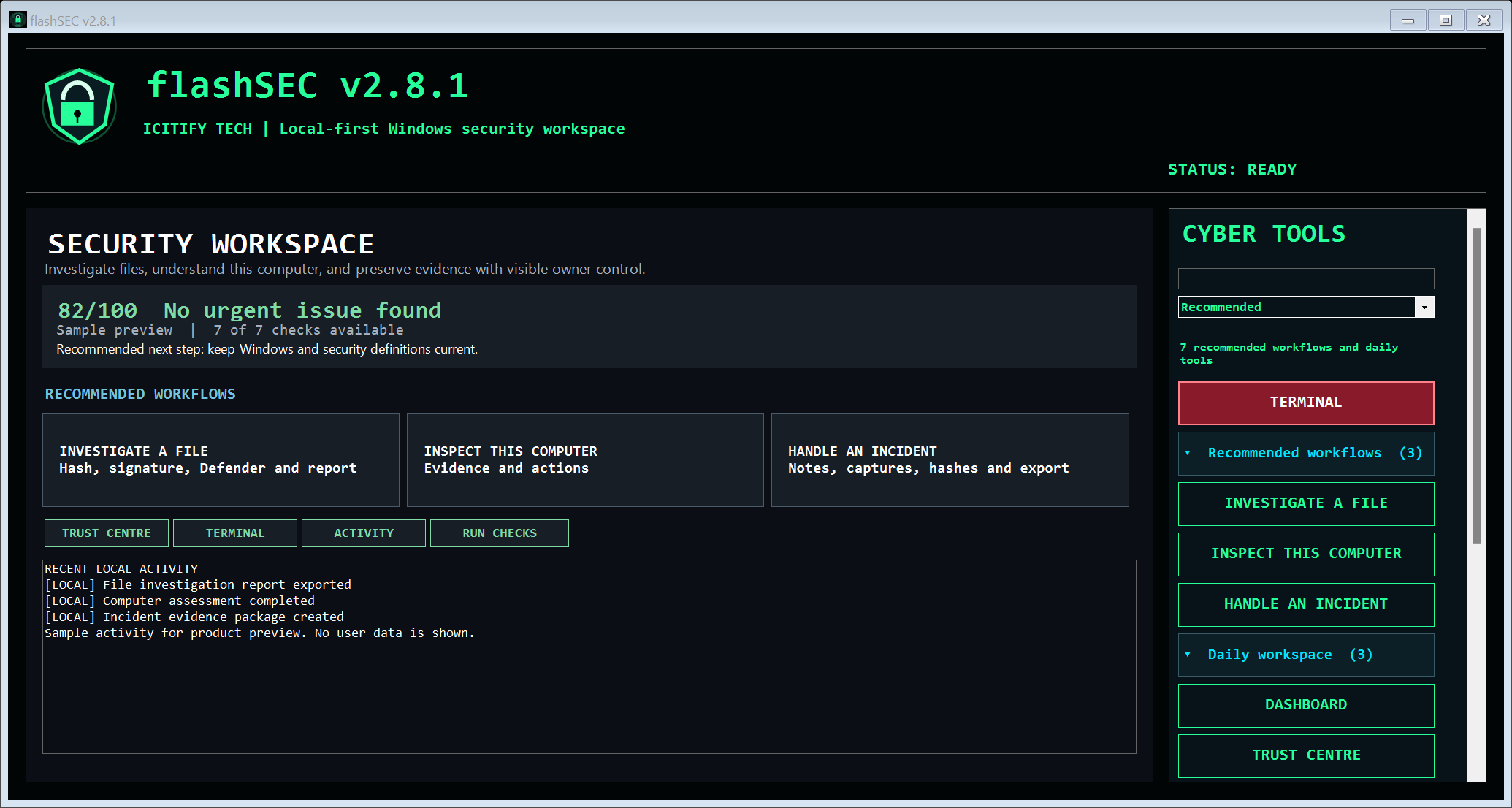
flashSEC now opens as a focused security workspace instead of a wall of tools. Investigate a file, inspect this computer, or preserve incident evidence, with clear limits, visible confirmation, and local-first handling throughout.
Create a local SHA-256 hash, inspect metadata and signature state, and optionally start Microsoft Defender. The selected file is not uploaded by this workflow.
Review point-in-time evidence for Defender, firewall, updates, storage, startup entries, listening ports, and the local flashSEC workspace, with honest coverage labels.
Collect only the files, screenshots, audio, notes, and local activity you choose, then export a ZIP package with hashes and a manifest.
See what flashSEC can access, where local data is stored, which features use the network, and how to export diagnostics or remove local records.
Open real local PowerShell, Command Prompt, WSL, or detected Kali WSL sessions with tabs, split view, find, copy, and paste. No automatic transcript is created.
Keep authenticated vault, reviewed quarantine, evidence integrity, USB guidance, recovery, and image-metadata tools within a clearer owner-controlled workspace.
BUILT FOR SERIOUS WINDOWS WORK
COMFORT YOU CONTROL
Primary tools use DPI-aware, responsive layouts. Choose green, blue, or Windows high contrast colors; Safe Mode stops background animation; keyboard navigation and scrollable tool lists keep commands reachable.
OFFICIAL WINDOWS RELEASE
For Windows 10/11 x64. The Store is the primary install and update channel for the approved public release.
Review the terms and privacy policy before installing.
Microsoft manages installation and Store updates.
Checking direct-release availability...A FEW THINGS TO KNOW
File tools operate on your PC. Vaults, recordings, quarantine contents, incident packages, settings, and activity records are local unless you deliberately copy or share them. Optional HTTPS lookup, map, and update services receive the information needed for those requests; see the privacy policy.
It is a point-in-time summary of the checks flashSEC could read. The assessment displays its coverage and unavailable checks. It is guidance, not proof that a device is safe and not a replacement for maintained antivirus protection.
No. It reports standard GPS metadata already inside an image. It can also attach coordinates that the owner explicitly provides to a new copy. It cannot reliably determine an exact location from image pixels.
The Live Terminal does not create an automatic transcript. It runs commands under your signed-in Windows account without silent elevation. PowerShell, Command Prompt, WSL, and Kali WSL availability depends on what is installed on your computer. You remain responsible for authorization and every command you run.
No. Continue using maintained antivirus protection and independent backups. Recovery and threat detection are never guaranteed, and encrypted files require the correct password or recovery key.
Visit flashSEC support and include your app version and Windows version. Trust Centre can export a diagnostic report designed to exclude commands, selected paths, vault contents, quarantine contents, and recordings.
MORE FROM ICITIFY TECH
 PaprFloFinance
 BiteVirusSecurity